

- Main
- Ideas and tools
- Online School Automation: What, How, and Why to Automate
Online School Automation: What, How, and Why to Automate
You launched your online school. The first students enrolled. And suddenly, most of your day goes not to creating courses, but to busywork: answering the same questions, manually granting access, reminding students about deadlines, collecting payments, copying data from one spreadsheet to another.
According to McKinsey, up to 45% of work tasks can be automated with existing technology. For online schools, that number is even higher: most processes — from sales funnels to analytics — can run on autopilot. Not “someday.” Right now.
This guide gives you a concrete plan: which 7 processes to automate first, how much time you’ll save, how to implement each one step by step, and which mistakes to avoid.
Why Automation Isn’t a Luxury — It’s a Necessity
Simple math. If you’re a solo creator or a small school owner, you have 168 hours per week. Minus sleep, minus life — you’re left with 50–60 working hours. If 40 of those go to manual tasks, you have 10–20 hours for creating content and growing your school. That’s not scaling — that’s surviving.
As your school grows, the problem compounds. Every new student means more manual work: verify payments, send access links, answer “where do I find the lesson?”, remind about homework. With 50 students, it’s manageable. With 500, it’s physically impossible without a team. With 5,000, even a team can’t keep up.
Online school automation solves three problems at once:
- Time. You free up dozens of hours per week for what actually requires your expertise: creating courses, recording lessons, engaging with students live.
- Quality. Automated processes don’t forget, don’t make mistakes, don’t get tired. Students get access instantly after payment — not 3 hours later when you finally see the notification. Reminders arrive on time. Feedback is collected at the right moment.
- Scale. Manual work scales linearly: twice the students = twice the work. Automation scales differently: the system serves 100 and 10,000 students with the same effort.
If you’re planning to scale your online school, automation isn’t optional. It’s the foundation. Without it, growth turns into burnout.
7 Processes to Automate First
You don’t need to automate everything at once. Start with the processes that eat the most time and have the biggest impact on revenue and student experience.
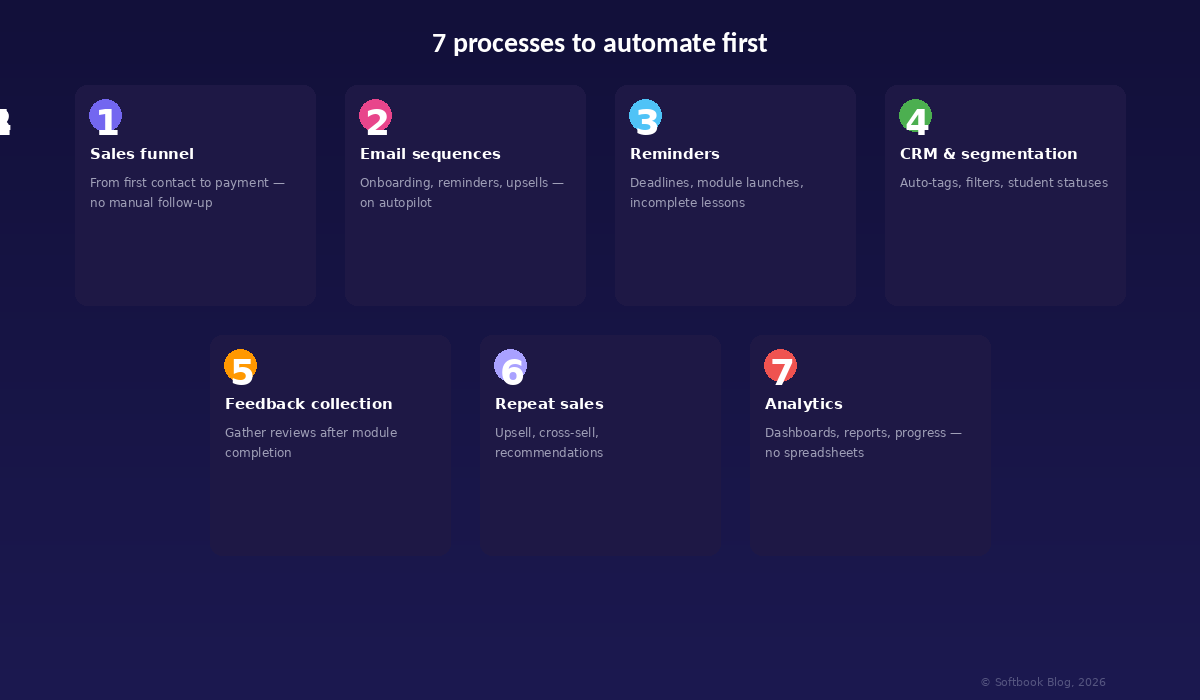
1. Sales Funnel
Your online course sales funnel is the journey from first contact to payment. Without automation, every step requires your involvement: respond to inquiries, send payment links, follow up with people who didn’t complete checkout, manually grant access after confirmation.
An automated funnel works differently. Someone lands on your page, downloads a lead magnet (free checklist, mini-course, webinar), receives a nurture email sequence, sees a time-limited offer, pays — and instantly gets access to the course. All of this happens without a single action from you. 24/7.
What to set up: a landing page with a capture form, a nurture email sequence (3–5 emails, spaced 1–2 days apart), payment processing with automatic access upon purchase. Bonus — an abandoned cart sequence: if someone starts checkout but doesn’t finish, they get a reminder an hour later.
2. Email Sequences and Student Onboarding
The first 48 hours after enrollment are critical. If a student doesn’t understand where to go or what to do, they leave. For good.
Automated onboarding fixes this. The sequence is simple: welcome email with “how to get started” → 24 hours later, a reminder about the first lesson → 3 days in, a check-in: “Is everything clear?” → one week later, a motivational email featuring another student’s story. This trigger-based email sequence launches automatically after registration and guides students through their first steps.
Email marketing for online schools isn’t spam. It’s a communication system that drives student retention and course completion rates. Schools using automated onboarding see 25–40% higher first-module completion rates compared to those that just send a single welcome message.
3. Automated Reminders
Students are busy people. They forget about deadlines, skip lessons, procrastinate on assignments. If you remind them manually — you don’t scale. If you don’t remind them — you lose completion rates.
Trigger-based scenarios solve this: an automatic notification when a student hasn’t logged in for 3 days; a reminder the day before a homework deadline; an alert when a new module launches; a congratulation when they complete a section. On Softbook, these triggers are set up in minutes through a visual interface — no code, no complex integrations.
The key principle: reminders should be helpful, not annoying. “Tomorrow is the deadline for Module 3 homework — don’t miss it” works. “You haven’t been around in a while, come back!!!!!” doesn’t.
4. CRM and Student Segmentation
When you have 20 students, you remember each one. At 200 — not anymore. At 2,000 — it’s impossible without a CRM system for your online school.
Automated segmentation divides students by behavior: who’s active, who’s stuck on a specific lesson, who completed the course, who hasn’t paid for the next one. Each segment gets relevant communication. Active students — an offer for an advanced course. Those who are stuck — a motivational email with a specific tip. Those who finished — an invitation to the next program.
Auto-tags and filters let you build targeted campaigns instead of mass emails with the same message for everyone. The result: higher conversion and fewer unsubscribes, because each student receives exactly the message that’s relevant to them right now.
5. Feedback Collection
Reviews are the currency of trust in online education. They impact landing page conversion, help improve courses, and motivate new students. But collecting them manually is unrealistic.
Automated collection works like this: after completing a module or course, the student receives a short survey (3–5 questions, no more). Responses are stored in your CRM, and the best reviews automatically go into a social proof library you can use on landing pages and in ads.
The two best moments to ask: right after module completion (while emotions are fresh and impressions are specific) and 30 days after the course (when students have seen real results and can talk about them).
6. Repeat Sales and Upsells
Acquiring a new customer costs 5–7x more than selling to an existing one. Automated repeat sales are the cheapest and most effective revenue source for any online school.
How it works in practice: a student completes the basic course → automatically receives an email offering the advanced course at a 15% alumni discount → if they don’t buy within 3 days, they get a case study from a graduate who completed both courses → one more week later, a reminder that the discount is expiring. Cross-sell, upsell, personalized recommendations — all running on autopilot, generating additional revenue without your involvement.
7. Analytics and Reporting
If you’re still collecting statistics manually in Google Sheets, you’re spending hours on what should take seconds. Automated dashboards show you in real time: how many students are active, course completion rates, this month’s revenue, where traffic is coming from, which lesson students drop off at most.
Online school analytics isn’t reporting for the sake of reporting. It’s a decision-making tool. See that 60% of students drop out at lesson four? That lesson needs a redesign. See that your email sequence has a 5% conversion rate instead of the expected 15%? Time to test different subject lines. Without data, you’re guessing. With data, you’re making decisions based on facts.
How Much Time Does Automation Save?
Let’s do the math. A typical online school with 500+ students spends roughly 40 hours per week on manual tasks. After automating key processes, that number drops to 8 hours — an 80% reduction.
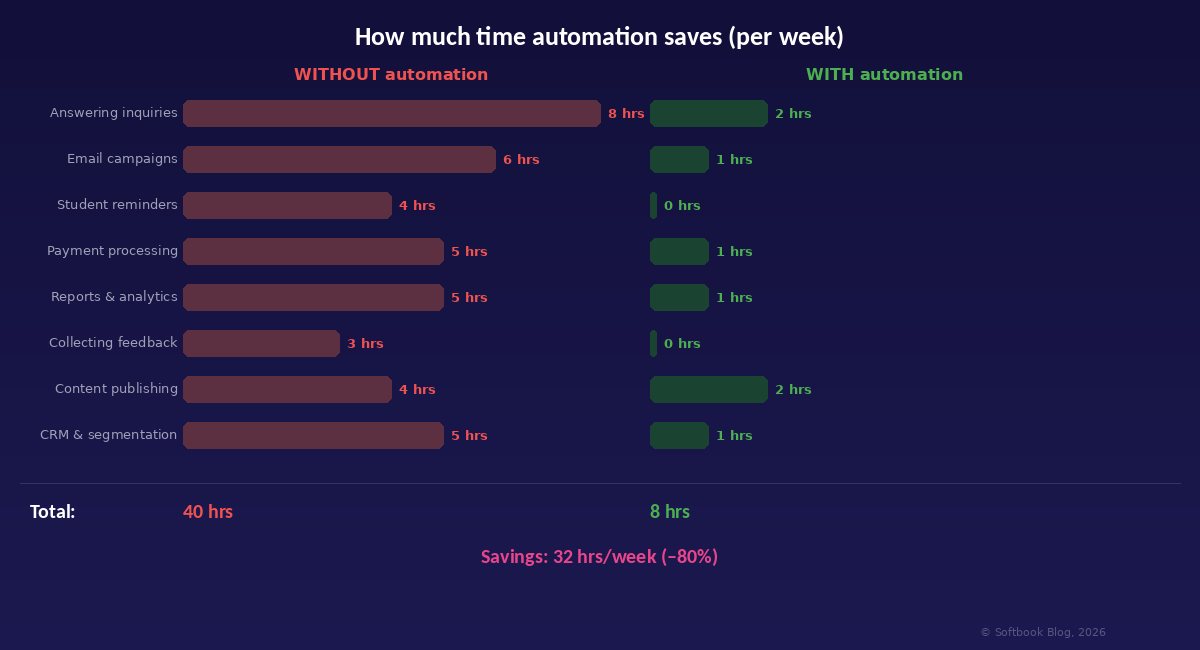
32 freed-up hours per week equals 128 hours per month. That’s an entire working month of extra time you can spend creating new courses, marketing, building community, or simply resting. Reducing manual work isn’t just about business efficiency. It’s about your quality of life as an entrepreneur.
In financial terms: if your hour is worth $30 (average expert rate), 128 hours per month is $3,840 in preserved value. Per year — nearly $46,000. Now compare that to the cost of an LMS platform that automates these processes.
Where to Start: An Automation Roadmap
Automation isn’t a one-evening project. It’s a gradual process with three stages. Each one builds on the previous.
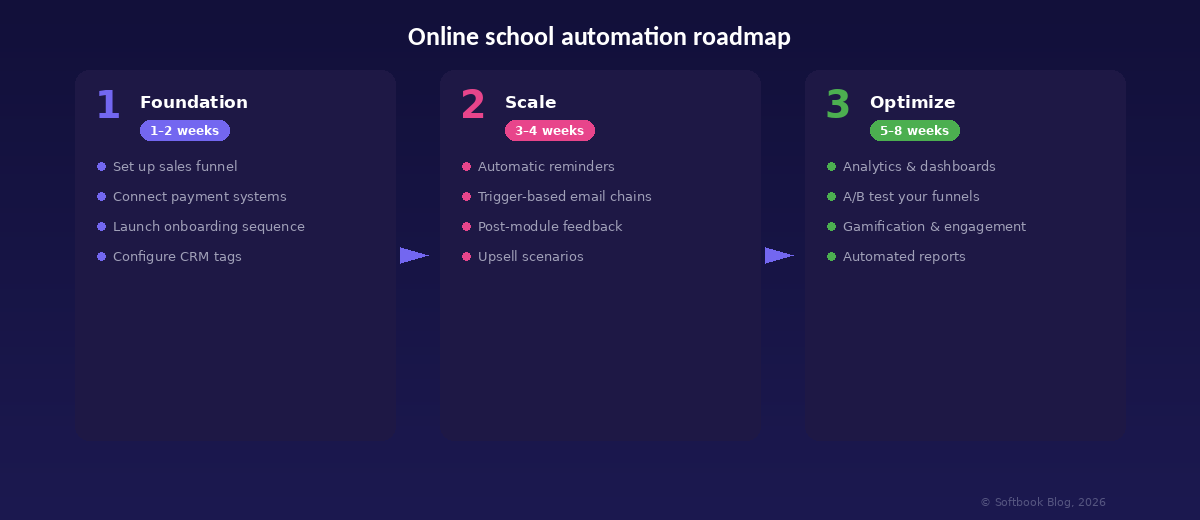
Stage 1. Foundation (Weeks 1–2)
Start with what makes money. Set up an automated sales funnel: landing page → lead magnet → email nurture → payment → instant access. Connect your payment processors. Launch a 3–4 email onboarding sequence for new students. Configure basic CRM tags: “new,” “active,” “completed course.”
At this stage, Softbook lets you build the entire cycle in a few days: from course creation to payment processing and automatic access delivery. Everything in one place — no developers, no external services, no complex integrations.
Stage 2. Scale (Weeks 3–4)
Once the foundation is running smoothly, add automated reminders for students (incomplete lessons, missed deadlines, new modules), trigger-based email sequences for different scenarios, post-module feedback collection, and upsell sequences for course graduates.
At this stage, you also set up segmentation: dividing students into groups by activity level and learning stage so each one receives relevant communication.
Stage 3. Optimize (Weeks 5–8)
Now it’s time to look at the data and improve. Set up analytics dashboards, run A/B tests on your funnels (which subject line converts better?), add gamification to boost student engagement, and schedule automated weekly reports.
Gamification in online schools — points for completed lessons, badges for streaks, game scenarios with competitive elements — increases course completion rates by 20–40%. Students don’t just learn; they feel progress and stay motivated to keep going.
5 Mistakes That Kill Automation
1. Automating Everything at Once
If you try to set up 15 automations in one day, none of them will work well. Start with the sales funnel and onboarding. Once those are stable and tested — add the next process.
2. Forgetting the Human Touch
Automation doesn’t mean “replace yourself with a bot.” Students need to feel that there’s a real person behind the platform. Automate the routine — access delivery, reminders, payment collection — but keep personal touchpoints: live webinars, answers to complex questions, personalized feedback on homework.
3. Not Testing Your Sequences
Set up an automated email sequence? Walk through it yourself as a student. Check every email, every link, every trigger, every condition. A broken automation is worse than no automation: students receive blank emails or links to nowhere, and trust in your school drops instantly.
4. Ignoring Analytics
Automation without analytics is autopilot without instruments. You can’t see whether the funnel works, whether students open emails, where they drop off. Set aside 30 minutes per week to review key metrics: funnel conversion, email open rates, course completion, average revenue per student.
5. Stitching Together 5 Different Tools
Email service separately, CRM separately, payment system separately, analytics separately, LMS separately — that’s not automation, it’s a zoo. Data gets lost between services, integrations break after every update, and you spend more time maintaining the stack than you save on automation. Online course management is effective when CRM, email, payments, analytics, and the course itself all work in one place.
Frequently Asked Questions
How much does online school automation cost?
If you use a platform where CRM, email, triggers, and automation are already built in, there are no extra costs — you pay for the platform and get everything together. On Softbook, all automation tools are available starting at $39/month — no extra charges for the number of students, emails, or automations.
Do I need a developer to set it up?
No. Modern LMS platforms let you configure triggers, email sequences, and funnels through a visual interface — no code required. If you can work with Google Docs, you can set up automation.
When should I start automating?
Ideally, from day one. The sooner you set up basic automations (onboarding, payments, access delivery), the fewer “manual habits” you’ll need to break later. But if you’ve been running your school manually — it’s never too late. Start with the sales funnel.
What should I automate if I’m a solo creator?
The minimum set: automatic access delivery after payment, a 3-email onboarding sequence, reminders about incomplete lessons. Even these three things will save you 10–15 hours per week and let you focus on what you do best — creating content.
Won’t students lose the “human” experience?
Quite the opposite. Automating routine tasks frees your time for genuine interaction. Instead of spending an hour manually sending access to ten students, you can host a live Q&A or write a detailed personal review of someone’s homework. Automation doesn’t replace humanity — it makes it possible.
Conclusion
Online school automation isn’t about technology. It’s about freedom. Freedom from routine that eats your time and energy. Freedom to scale without proportionally increasing your workload. Freedom to focus on what you do best — creating knowledge and sharing your expertise.
The 7 processes in this guide aren’t theory. They’re a concrete action plan you can implement in 4–8 weeks. Start with the sales funnel, add onboarding, build gradually — and in two months, your school will run while you sleep.
Share what you know. Let automation handle the rest.
Ready to start? Try Softbook free — 7 days of full access, no credit card required.
Articles are good, but social media posts are faster!
Subscribe to us and be the first to receive tips and tricks
on promoting your online school!


Earn money on your knowledge and experience with
Softbook!
to the platform for setting up your own school!

 Book a demo call now!