
How to Create an Online Course Step by Step

To create an online course, define the result a student should reach, split the path into modules and short lessons, record or write the materials, add quizzes and assignments, choose a platform for access and payment, then go through the course as a student and launch. AI can draft the structure, but the author finishes the course.
Key takeaways
- Start with one sentence about what the student can do after the course.
- Each module solves one sub-task, and each lesson holds one idea.
- Mix formats: video, screen recording, audio, text, PDF and practice tasks.
- AI drafts a structure and lesson outlines, and you write the course itself.
- Go through the whole course as a student before you open sales.
An online course is a sequence of lessons that leads a student to a specific result, delivered on a platform where they study at their own pace or with a group. A folder of videos becomes a course when it has an order, checkpoints and a clear finish.
What do you need before you create an online course?
You need three things before you record anything: a topic you know well, a specific group of people who need it, and a result they can reach. Equipment and software come later.
Write the result as one sentence that starts with "After this course you will be able to…". "Understand marketing" is too vague. "Launch your first ad campaign with a test budget" is something a student can check. Every lesson you add later has to move the student toward that sentence.
Then make an inventory of what you already have: webinar recordings, client presentations, checklists, notes from consultations. Most experts start with more material than they think. The problem is usually order, not volume.
Decide on the format early, because it shapes everything else:
- Self-paced: students start any day and move at their own speed. Lessons have to work without you in the room.
- Cohort: a group starts on a fixed date and moves together. You can add live sessions and deadlines. Teaching one student at a time is a separate model, covered in how to start an online tutoring business.
Finally, think about where the course will live. Students need a login, access to lessons in the right order, a way to submit work and, if the course is paid, a way to pay. You can choose the platform later, but knowing what it has to do saves a rebuild.
How do you create an online course step by step?
You create an online course in seven steps, from the outcome to the launch. The order matters: each step depends on the one before it.
- Define the result. One sentence about what the student can do after the course, and who that student is.
- Map the modules. Break the path to the result into large steps. Each module closes one sub-task and leads into the next.
- Plan the lessons. Inside each module, list lessons with one idea each. Mark where the student practices.
- Create the materials. Record video, write text, prepare PDFs and templates. Start with the lessons students need first.
- Add knowledge checks. A quiz after a lesson shows the student what they understood and shows you where the material did not land. Assignments turn knowledge into a skill.
- Set up access, pace and payment. Decide whether the whole course opens at once or lesson by lesson, how long access lasts and how students pay.
- Test and launch. Go through the course as a student, fix what feels unclear, then open enrollment and collect feedback from the first group.
How do you structure an online course into modules and lessons?
Structure the course from the result backward: the result defines the modules, and each module defines its lessons. A practical range is four to eight modules per course. With more than that, students lose track of where they are.
A lesson is one finished thought. If a lesson carries two key ideas, split it: short lessons are easier to start and to complete, and a completed lesson keeps the student moving. End each module with practice, a quiz or an assignment, so the student applies what they learned before moving on.
The format of each lesson depends on what it has to do:
| Lesson format | Works best for | Keep in mind |
|---|---|---|
| Video with you on camera | Explaining ideas, building trust | Short takes are easier to re-record than one long video |
| Screen recording | Software, step-by-step processes | Zoom in on small details and narrate every click |
| Audio | Interviews, reflection, learning on the go | Add a short text summary for students who skim |
| Text | Summaries, instructions, reference material | Use headings so students can find a step quickly |
| Workbooks, checklists, templates | Students may want to download or print it | |
| Quiz or assignment | Checking understanding, practicing a skill | Tie every question to the lesson's goal |
The same idea delivered in two formats, for example a video and a one-page summary, is easier to remember. For more ways to improve lessons, see 4 ways to improve your course content.
Can you create an online course with AI?
Yes, AI can help you create an online course, but it produces a draft, not a finished course. It is good at the blank-page stage: proposing a module order, splitting a topic into lessons, suggesting what each lesson could cover and in what sequence.
What AI cannot add is your experience. It does not know your cases, your clients' typical mistakes or the shortcuts you discovered over years of work. That is why people pay for your course rather than read a generic summary. AI-generated text can also contain factual errors and tends to sound the same across topics.
A workable approach:
- Give AI a precise brief: topic, audience level, the result, the number of lessons.
- Treat the output as an outline. Reorder, merge and delete lessons until the logic matches how you teach.
- Write or record the content of each lesson yourself, using the draft only as a plan.
- Check every fact, number and term before publishing.
How do you make a course without showing your face?
You can make a full course without appearing on camera, and many popular course formats work this way. Students care whether the lesson is clear, not whether they see the teacher.
Options that work well:
- Slides with voice-over. Record your voice over a presentation. This works for most theory lessons.
- Screen recording. Show the process on your screen while you explain it.
- Hands-only camera. For crafts, cooking, drawing or any hands-on skill.
- Audio lessons. Short audio episodes with a text summary.
- Text and PDF. Written lessons, workbooks and checklists. Some topics are easier to learn from text.
Invest in sound first. Viewers forgive simple visuals much faster than muffled or echoing audio.
Where should you host your course and how do students get access?
Host your course where lessons, student access and payment work together, because students experience all three as one product. There are three common setups:
- Separate tools: video hosting, a payment form and email access links. Cheap to start, but you connect everything by hand and track progress manually.
- A general website builder: good pages, but lesson order, quizzes and student progress are usually not what it was built for.
- An online course platform: lessons, quizzes, student accounts, access rules and payment in one place.
Whichever you choose, plan the access model. Access can start at enrollment and last a set period, follow fixed dates for a cohort launch, or open lesson by lesson on a schedule. A detailed breakdown of hosting options is in where to host your online course.
How to create an online course in Softbook
Softbook is a platform for online schools: courses, sales, CRM, email and Telegram campaigns, and a website builder in one place. You can add unlimited students, and the platform takes no commission on your sales. On the online course platform, AI drafts a course structure with modules and lesson outlines, and you finish every lesson in the editor.
- Generate a draft with AI. In "Education" → "Courses", click the magic wand button next to "Add Course". Describe what the course is about and what the student should be able to do after it, choose the course size, turn on "Group lessons into modules" if you want modules, then pick the audience, tone of voice and course language. Click "Create My Course". Within seconds you get a course structure with modules and drafts in each lesson. More on AI in Softbook.
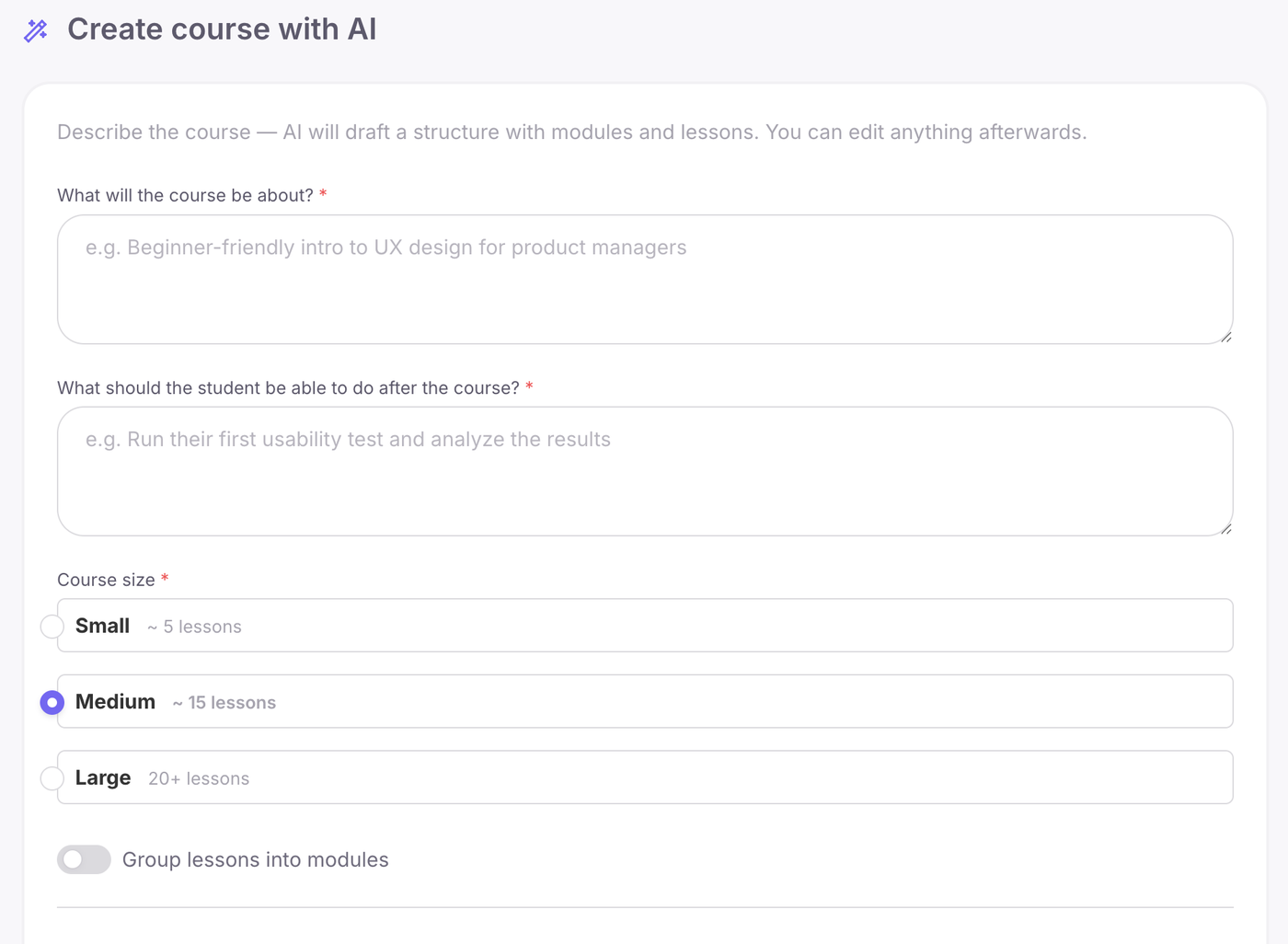
- Edit the structure and fill the lessons. Rename, delete and add lessons, then open a lesson and click "Add Element": upload a video, add audio, a text block, a file, a YouTube or Vimeo video, HTML code or a PDF that students flip through page by page inside the lesson. Long lessons can be split into steps. See the course builder.
Add tests and homework. Tests have eight question types, including fill in the blanks, ordering, matching and sentence builder, with a passing score, retakes and a time limit. Homework can accept voice answers and can be accepted automatically after a delay you set.
Set access and pace. In "Teachers and Access", choose access from the moment of enrollment, after completion or on fixed dates. Turn on "Enforce lesson progression order" so the next lesson opens only after the previous one is done, or use a schedule that opens lessons at intervals of minutes, hours or days.
Add a certificate of completion. Certificates are issued within the Softbook platform with the student's name, the course, a serial number and a QR code. A check by serial number or QR code shows that the certificate was issued through Softbook on behalf of the school named on it.
Check the course and set the price. Open the course as a specific student would see it from their student card, then set the price and currency in the course's "Sales" section after connecting your payment system.
One honest limit: AI gives you a structure and drafts, not a finished course. It does not record your videos or add your cases, and every lesson still needs your editing.
Related reading:
- How to create an online school from scratch
- Where to host your online course
- How to sell online courses
Build your first course structure and lesson in Softbook. Try Softbook free for 30 days, no card required.
Frequently asked questions
How long does it take to create an online course?
It depends on the size of the course and how much material you already have. Planning the result, modules and lessons usually takes a few focused sessions, while recording and writing lessons takes the most time. The technical setup is the fast part: in Softbook, your school with a course and payment acceptance can be technically live in 15 minutes.
Can I create an online course for free?
Yes, you can plan and build a first version of a course without spending money: write the outline, record with the phone or computer you have and prepare PDFs in any editor. To build the course on a platform, you can use Softbook's 30-day free trial, no card required. Current plan terms are on the Softbook pricing page.
Can AI create a whole course for me?
No, AI creates a draft: a structure with modules, a lesson order and outlines for each lesson. Your examples, cases, practice tasks and fact-checking still come from you. In Softbook, AI generates a course structure with modules and lesson drafts in seconds, and you edit everything in the course editor.
Do I need to show my face in an online course?
No, you can build a full course without appearing on camera. Slides with voice-over, screen recordings, hands-only video, audio lessons, text and PDF workbooks all work. Clear sound matters more than the picture, so invest in a decent microphone first.
How many lessons should an online course have?
As many as the result needs and no more. A practical structure is four to eight modules with a few short lessons in each, where every lesson carries one idea. If a lesson covers two key ideas, split it into two.
What is the best way to record course videos?
Record short takes of a few minutes each, one idea per video, so mistakes are easy to fix. Use a quiet room, an external microphone and soft light facing you. For software lessons, record your screen and narrate each step. Write a short outline before each take instead of a full script you read aloud.