
How student onboarding can become your strongest marketing tool

Most course creators pour all their energy into the sale. They spend weeks polishing ad copy, burning budget on targeting, inventing promotions — all to get someone to click «Buy». And then? Then it often goes quiet: the student gets access and is left alone with a dozen lessons.
Yet the strongest marketing lever sits right here — in how you welcome a new student. Onboarding isn’t a bundle of access emails. It’s a person’s first experience with your course, the moment they decide: «I made the right choice» or «I wasted my money». This is where trust, loyalty and future referrals are built.
Picture this: a student opens the course and immediately knows where to go, what result they’ll get, and that someone thought about their comfort. That experience works better than any ad. A happy student tells friends, leaves reviews, and comes back for the next product.
Below are 5 ways to turn onboarding into your school’s hidden superpower. And at the end, we’ll show how to combine them into one automated flow that runs without your daily involvement.
A warm, friendly start
The first contact after payment sets the tone for everything that follows. A dry «here’s your access to the materials» makes a person feel like just another row in a sales spreadsheet. A warm, personal welcome does the opposite: it thanks them for their trust and shows that they were expected. Add a short first-steps guide — how to log in, where the main module is, who to message if something doesn’t work.
A small touch — a reminder that «you made the right choice» — removes the doubts that often surface in the first hours after a purchase. And using their name or asking a quick question about their goals shows right away that you see a person here, not a transaction.
How it works in Softbook
You don’t have to send that welcome by hand to everyone. In Softbook the welcome email is built in a block editor — from templates in 8 languages (uk, ru, en, es, fr, de, pl, pt) with no machine translation, so the text reads naturally in the language the student is learning in. It fires automatically on the «enrollment» trigger: the moment someone gets access, they see a warm personal welcome, and you never touch the send. One flow — and every new student gets the same thoughtful start.

A quick win for the student
People come to courses for a sense of progress as much as for knowledge. If day one greets a student with two hours of lectures and a hard assignment, their enthusiasm fades before they even begin. So give them a fast result — a small step that triggers the feeling of «I can already do this».
It could be a quick get-to-know-you task, a simple practical technique tied to the course topic, or a ready-made template or checklist they can use straight away. The point is for the student to feel, from day one, that their investment of time and money is already paying off.
How it works in Softbook
In Softbook a first win is easy to build into the course itself. A gamification reward scenario marks the student’s first action — a completed intro lesson or a submitted mini-task. A quiz with instant feedback delivers that same «it’s working» moment right inside the lesson, with no external services. And dynamic course templates help you put a short «easy» module up front, one that’s pleasant to start with. For how to design first steps that pull students in, see the guide «How to create addictive courses learners can’t put down».
Clear navigation and structure
Picture a student opening the course to chaos: dozens of materials with no logic, tasks scattered across tabs. Even a motivated person gets lost and spends energy searching instead of learning. Give them a simple map of actions instead: what to open first, what comes next, where to ask a question. A short «how to use the platform» guide works well, along with a checklist of steps: welcome video → first lesson → assignment → community.
Structure is part of the experience, not a formality. When a student is confident about what to do next, they stay focused on what matters. And that calm is exactly what they’ll remember when they recommend the course.
How it works in Softbook
In Softbook the structure does the navigating: a course splits into modules and lessons, and under every lesson there’s a «Next lesson» button — the student never hunts for where to go, the next step is always at hand. A «how to use the school» section sits neatly in the knowledge base builder: one place for instructions, answers to common questions, and course rules. The student always knows where to look if they forget a step.
Social connection
Learning rests not only on knowledge but on a sense of support. From the first days, let the student feel: «I’m not alone here». Social connection strengthens motivation and creates that sense of belonging people seek out in live communities.
The simplest step is a small introduction: ask people to say a few sentences — who they are, why they joined, what goal they’re after. It breaks the «I’m a stranger here» barrier. From there the community starts working on its own: when one person shares a success, it pushes others not to stop. Often it’s the like-minded people nearby who become the reason a student finishes the course.

How it works in Softbook
In Softbook, conversation lives in the same place as the learning. The built-in social network gives you a messenger, student profiles and a school feed — you can kick off introductions with an ordinary post in the feed, instead of herding people into a separate third-party chat that you then have to administer on the side. Students see their peers, ask questions and share progress without ever leaving the platform.
A small wow-effect
A course is usually imagined as a set of lessons and tasks. So a pleasant bonus no one expected delivers an emotion you can’t buy with advertising — a genuine «wow». And those are the emotions people remember and pass on to others.
The gift doesn’t have to be big: an extra PDF guide, a set of templates, a short video with an insight outside the program, or even an inspiring note from the author. The one rule is that the bonus must be truly useful and tied to the topic. Not a «gift for the sake of a gift», but something that helps the student feel valued.
How it works in Softbook
A bonus material sits comfortably inside the course or in the knowledge base — it shows up exactly where the student will see it. And the real surprise at the end is the certificate: in Softbook a flexible builder puts it together, where you can set your own background image and a custom QR in the school’s style. A document worth sharing on social media is both a wow-effect and natural advertising for your course. And for how to build a premium feel across the whole course, not just at the start, we broke it down in «Premium course without the premium price».
How to combine it all into one onboarding flow
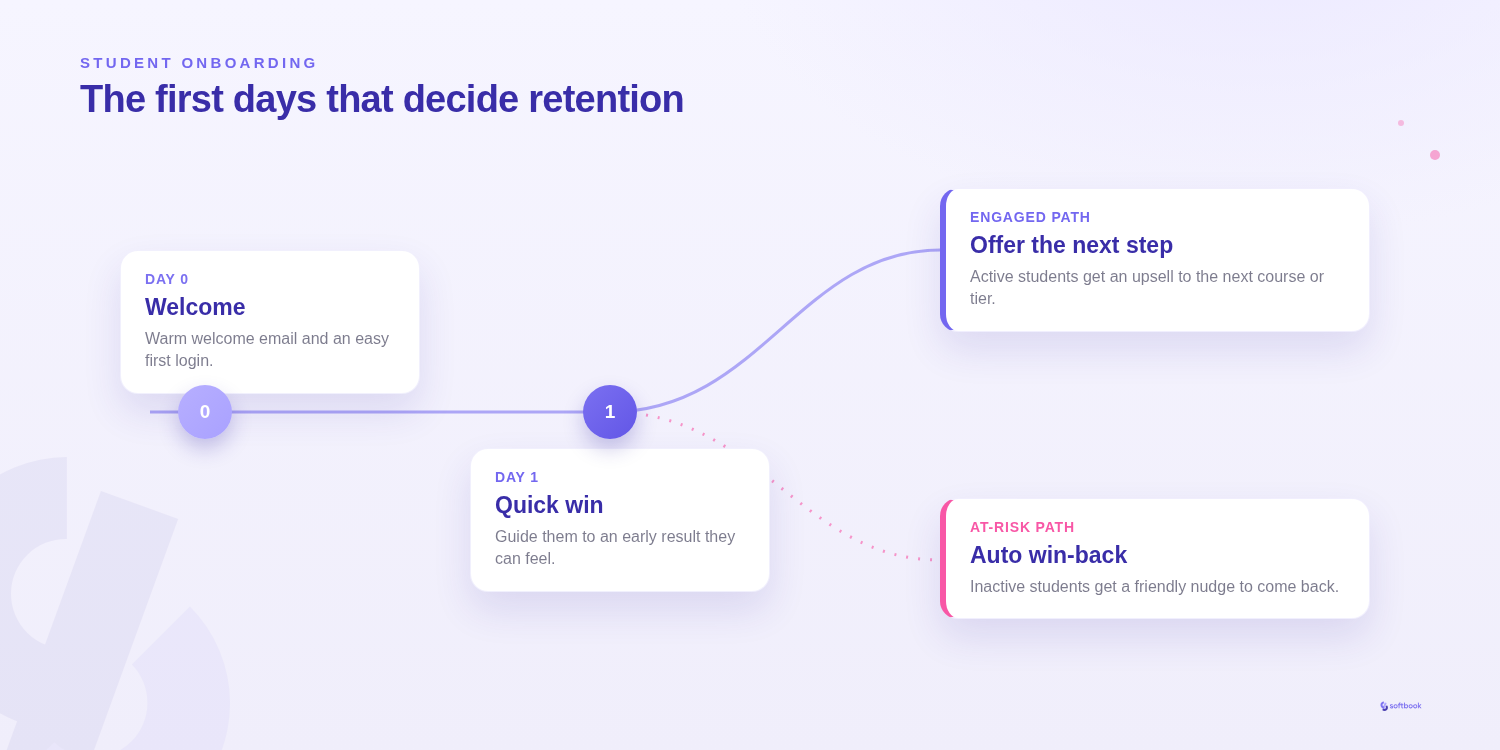
The five ways above work best when they don’t hang on you as manual work but run on their own. In Softbook that comes together as one end-to-end flow in the visual automation builder:
- «Enrollment» trigger — the moment a student gets access.
- Day 0 — welcome email: a warm greeting and first steps.
- Day 1 — quick-win email: a small task that creates a sense of result.
- Activity branch. Those who’ve started learning get the next step and an invitation to the community. Those who haven’t logged in yet get a gentle win-back: «your course is waiting».
The whole mechanic lives in one builder, and step-by-step completion stats are visible — you can see where students get stuck and adjust the flow. Set it up once, and every new student goes through thoughtful onboarding without your daily involvement. For more on what to automate first, see the guide «Online school automation».
Conclusion
The first 48 hours after a purchase are decisive. That’s when a student decides whether to fall for the course or quietly disappear, never reaching the heart of it. And more often than not, it’s the quality of the first experience — not the difficulty of the material — that decides.
Well-designed onboarding works as a bridge of trust: a person sees right away that they were cared for, that they were expected, that they won’t get lost. Those emotions affect not only completion but future sales too — a satisfied student recommends the course, leaves reviews, and comes back on their own.
So treat onboarding as a marketing investment. Make the first days warm, clear and inspiring — and every new student has every chance of becoming your ambassador.
Try Softbook free — 30 days of full access, cancel anytime.
Frequently asked questions
What is student onboarding and why does it matter?
Student onboarding is a person's first experience with your course right after purchase: the welcome, the first steps, navigation and support. It matters because the first days are when a student decides whether they made the right choice. Good onboarding builds trust, keeps motivation high, and turns a newcomer into a loyal student who recommends the course to others.
How many emails should a welcome sequence have?
There's no universal number, but 3–5 emails usually do the job: a warm welcome with first steps, a quick-win email, a nudge about the community and support, and a gentle motivational email for those who haven't started. What matters isn't the count but the relevance — each email should remove a specific first-days barrier.
How do you automate onboarding in an online school?
You automate onboarding with a flow that runs on its own the moment a student is enrolled. In Softbook this is built in the visual automation builder: the «enrollment» trigger sends the welcome email, then a quick-win email, then an activity branch — active students get the next step, inactive ones get a gentle win-back. Step-by-step completion stats are visible, so you can keep refining the flow.
How does onboarding affect sales and referrals?
A student who's warmly welcomed and guided through the first days is more likely to finish the course, leave positive reviews, and buy the next products. Satisfaction with that first experience is word of mouth: a person recommends the course to friends with zero ad budget. That's why onboarding works as a quiet but powerful marketing channel.
What should you do in the first days after a course purchase?
Send a warm personal welcome with a first-steps guide, give a quick win — a small task with a tangible result, show clear course navigation, invite the student into the community, and, where possible, add a pleasant bonus. These five steps build trust and set the tone for the whole course.