How to Sell Online Courses: Where to Sell and How to Start

Selling an online course takes four things: a clear offer, a page with a price and checkout, access that opens automatically after payment, and a channel that brings buyers to that page. You can sell on a course marketplace, through social media and messengers, at webinars, or on your own school platform, where you keep the customer list.
Key takeaways
- A course sells best when price, checkout and access sit on one page.
- Marketplaces bring ready traffic, but the customer list and pricing rules stay with them.
- Your own school platform gives you the price, the brand and the student data.
- With no audience yet, start with an email list and a free product.
- Price a course by its result and format, not by the number of videos.
Selling an online course means taking payment for access to lessons and opening that access to the buyer right after the payment. The work has two halves: where the sale happens (the page and the checkout) and how people find that page (marketing). Most problems with course sales sit in one of these halves, and they are fixed differently.
Where can you sell an online course?
There are four common places to sell an online course: your own school platform, a course marketplace, social media and messengers, and webinars. Most schools combine them: one place takes the payment, and one or two others bring buyers to it.
Your own school with a landing page and checkout
This can be a website you assemble from a builder and plugins, or a platform made for online schools, where the course, the checkout and the student accounts are already connected. You set the price and the currency, the page carries your brand, and every buyer's contact stays in your database. The trade-off is traffic: nobody brings visitors for you, so you need at least one channel from the sections below.
If you sell to students in other countries, check two things before you choose: whether the platform lets you set the price and currency for each product, and whether it takes a commission on sales on top of the payment processing fee. The other checks are in how to choose an LMS platform.
Course marketplaces
A marketplace is a catalog where people already search for courses. It works for testing an idea with a ready audience. In return, a marketplace usually takes a share of each sale and sets its own rules for prices and promotions. The buyer remembers the marketplace rather than you, and their contact details usually stay with the marketplace, so selling them your next course is harder.
Social media and messengers
Social media is where people get to know you before they buy: posts, short videos, live streams, direct conversations. It is a strong place to warm up an audience and a weak place to take payment. Without a checkout page, you collect money by hand and open access by hand, and your reach depends on rules you do not control. The usual fix is simple: every post and message leads to one sales page with a checkout.
Webinars
A webinar lets you explain the course live, show your teaching style and answer questions before people decide. It fits courses that need explanation or cost more than an impulse purchase. The sale happens at the end: you give a link to the checkout page while people are still in the room, and you send it again by email to everyone who registered.
| Where you sell | Who owns the customer list | Control over price | Payment and access | Good for |
|---|---|---|---|---|
| Your own school platform | You | Full | Checkout on your page, access opens after payment | A school you build for years |
| Course marketplace | Usually the marketplace | Limited by marketplace rules | Handled by the marketplace | Testing an idea on an existing audience |
| Social media and messengers | The platform holds followers, you get contacts when people sign up | Full | Manual, unless posts lead to a checkout page | Warming up, direct conversations |
| Webinars | You, if registration collects emails | Full | Checkout link during and after the event | Courses that need explanation |
How to start selling an online course: step by step
You can start selling before the course is fully recorded. The order below keeps the risk low: you check demand first and build the rest around what buyers ask for.
- Choose one audience and one result. "Beginner designers who want their first paid client" sells better than "design for everyone".
- Check demand. Offer a pre-sale, a free lesson or a waitlist. If nobody signs up for a free lesson, a paid course will not fix that.
- Write the sales page. Who the course is for, what the student will be able to do, the program, who teaches, the format, the price, answers to common objections and the checkout.
- Connect payment. Set the price and the currency, and make sure the buyer can pay on the same page without writing to you.
- Open access automatically. After payment, the student should get a login and the course without waiting for you to reply.
- Pick one main channel. Content, email, webinars or ads. Add a second one only when the first works.
- Follow up with people who did not buy. Collect emails on the page and send a short sequence: the problem, the program, answers to questions, a reminder of the deadline if there is one.
- Ask your first students for feedback. Their words improve the sales page more than any rewrite of yours.
How do you price an online course?
Price a course by the result it gives and the format it comes in, not by the number of hours of video. A short course that solves one painful problem can cost more than a long overview.
A few principles that hold in most niches:
- Format sets the range. Self-paced video costs less than a course with homework review, live sessions or a chat with the teacher.
- Look at similar formats in your niche, not at the most expensive or the cheapest offer you can find.
- Offer levels. One course can become several products: self-study access, and access with feedback or extra materials.
- Use discounts with a real deadline. A launch price that ends on a set date is honest. A countdown that restarts every day is not.
- Raise the price as proof appears. Reviews, case studies and a refined program are reasons to charge more for the next group.
How do you market an online course?
You market an online course by building a path from the first contact to the sales page and measuring which part of that path brings paying students. Four channels do most of the work for course creators:
- Content. Articles, videos and posts that answer the questions your future students search for. It is slow to start and keeps working for a long time.
- An email list. A free lesson, checklist or mini-course in exchange for an email, then a sequence that leads to the paid course. Email is the channel you own: no algorithm decides who sees your message.
- Webinars. One live session can answer the questions that a page cannot.
- Partners and ads. Partners with the same audience can recommend your course for a share of the sale. Paid ads make sense once the sales page already converts visitors from other channels.
Tag every link with UTM parameters. Then you can see which source brought revenue, not only visits.
Can you sell an online course with no audience?
Yes, but expect it to take longer, and start with a list rather than a big launch. Without an audience, the first task is to get people who are interested in your topic to leave an email.
A realistic start looks like this: one free product (a lesson, a guide, a short challenge), one channel where you publish regularly, and a small first paid group. A small group is easier to sell, you can work with each student closely, and their results and reviews make the next sale easier.
What else can you sell besides one course?
Once one course sells, you can package the same knowledge in other formats:
- A bundle of several courses at one price.
- A subscription with regular payments for ongoing access, new lessons or a community.
- A free product that collects contacts and leads to the paid course.
- Consultations, templates or materials sold separately: the buyer gets a link after payment. If one-to-one sessions are your main product, read how to start an online coaching business.
- An offer after the course: a next-level course shown to students who finished the first one.
How to sell online courses with Softbook
Softbook is a platform for online schools: courses, sales, CRM, email and Telegram campaigns, and a website builder in one place. You can add unlimited students, and the platform takes no commission on your sales. The buyer pays on a product page or a landing page, and the course opens to them automatically after payment. See how it works on the platform to sell online courses page.
The technical setup is short: in 15 minutes you can have a school with a course that accepts payments. Here is the sales part, step by step.
- Create a product. In "Sales", open "Products", click "Add Product" and choose a type: "One course", "Some courses" (a bundle), "Subscription", "Free product" or "Custom product". For a custom product, the field "What the customer will receive" holds the link the buyer gets after payment: an online meeting, a file or any other material.
- Set the price and the currency. You do this on the "Materials and pricing" step, separately for each product. To accept payments, connect a payment system to your school first. The payment system charges its own processing fee under its terms. Softbook adds no commission.
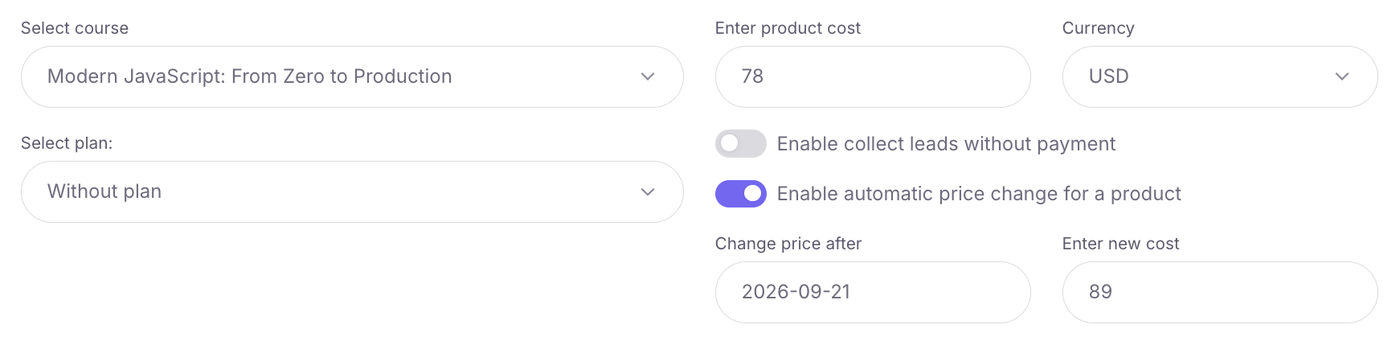
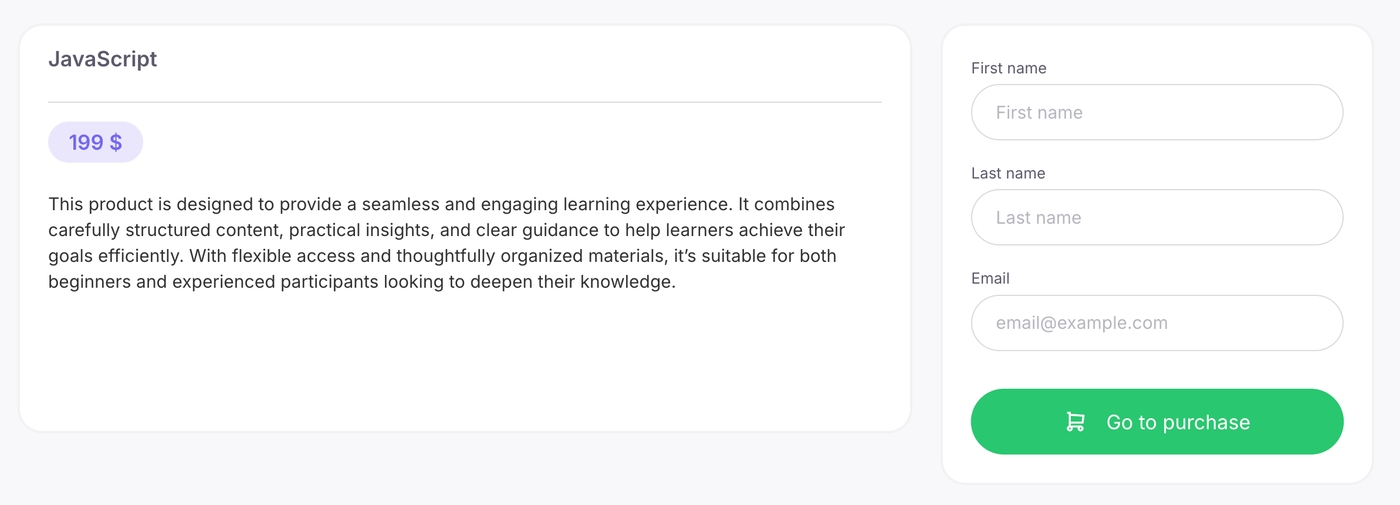
- Choose where the buyer pays. It can be the product page (four ready templates or your own design) or a landing page from the page builder. On a landing page, the Product element puts the checkout, with a promo code field, right on the page. After payment, the student is enrolled in the course automatically.
- Add discounts and promo codes. A discount shows the crossed-out price and a countdown timer on the course card and the product page. Promo codes can be single-use or reusable, created by hand or generated in bulk, and each code has its own statistics down to the customer and the order.
- Send buyers into the CRM. On the CRM step of the product, choose "Create deal in CRM after the order", "Create deal in CRM after the payment" or both, each at its own funnel stage. Deals, contacts and tasks live in sales and CRM.
- Sell the next course. An offer after the course shows students who finished it a pop-up with the next course and a discounted price.
- See which source brings revenue. UTM tags from the landing page go into the order, and analytics shows the top UTM sources by revenue.
What Softbook does not do: there is no separate abandoned-cart trigger, and the platform does not calculate taxes. Your school handles taxes under the rules of its country.
Build a sales page with checkout for your course. Try Softbook free for 30 days, no card required.
Related reading
Frequently asked questions
How much does it cost to sell online courses?
The cost has three parts: the platform where you host and sell the course, the processing fee of the payment system, and marketing. Some platforms also take a commission on each sale, so check this before you choose. Softbook takes no commission on sales: the school pays for its plan, and the payment system charges its own fee. Current Softbook prices are on the pricing page at softbook.app/pricing.
Do course platforms take a commission on sales?
It depends on the platform. Marketplaces usually keep a share of each sale, and some school platforms charge a percentage on top of the subscription. Softbook does not take a commission on sales. The only percentage you pay is the processing fee of the payment system you connect, under that system's own terms.
Can I sell an online course without a website?
Yes. You need a page with a price and a checkout, not a full website. A product page or a single landing page is enough, and you can lead buyers to it from social media, messengers, email and webinars. In Softbook, the page builder lets you put the checkout right on a landing page, and a product page comes with four ready templates.
How do students get access to the course after they pay?
On a platform with a built-in checkout, access opens automatically. In Softbook, the buyer fills in the form, pays, sees a confirmation page and gets an email with login details and access to the product. If someone pays by bank transfer, the school marks the order as paid, and access and login details are sent the same way.
Can I sell an online course as a subscription?
Yes. A subscription gives access to a course or a set of courses for a chosen period with regular payments. In Softbook, the first payment can differ from the regular one, you can add a free period, and students can cancel or renew the subscription themselves. Saving the card is what makes the next payment go through.
Do I need a registered business to sell online courses?
The rules depend on your country, so check the requirements for selling services and paying taxes where you live or where your company is registered. Payment systems also have their own requirements for who can connect. Softbook does not calculate or pay taxes for the school: the school handles taxes under the rules of its country.